
atmos:citation:instruments:setup_dracal_usb_barometer:home
Setting up the Dracal USB Barometer
Manual: Dracal USB Barometer Manual
Parts
The Dracal USB Barometer has only one component: the USB stick itself.

Setting up the Probe
By now, you should have your Raspberry Pi computer completely set up, with a DAQ HAT. To continue, you will need:
- the USB barometer
- Go to Dracal Linux Setup and follow the setup instructions. Make sure you place all the files it requires you to download into the same directory that your coding script for your instrument is.
- For example:
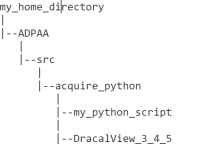
- Plug the USB stick into an open port on your Raspberry Pi computer.
- Note that if you are using python, you should change the directory name from “DracalView_3.4.5” to “DracalView_3_4_5” to allow python to function.
- Update as of 2026.06.01
- It is best to use serial mode with the Raspberry pi. Additionally, the code provided will only work for serial.
- To switch to serial mode, see Getting Started with VCP Mode: User on Linux
- If you have properly set up the ADPAA and DAQ HAT, you can now run the python program that coincides with your instrument and observe the data.

atmos/citation/instruments/setup_dracal_usb_barometer/home.txt · Last modified: 2026/06/01 19:55 by ashley.vos